
PR Admin – Login & Menus
- Login to the Planetrehab EMR interface with Login URL provided by the Planetrehab.
- With the valid credentials that are provided by the IT team
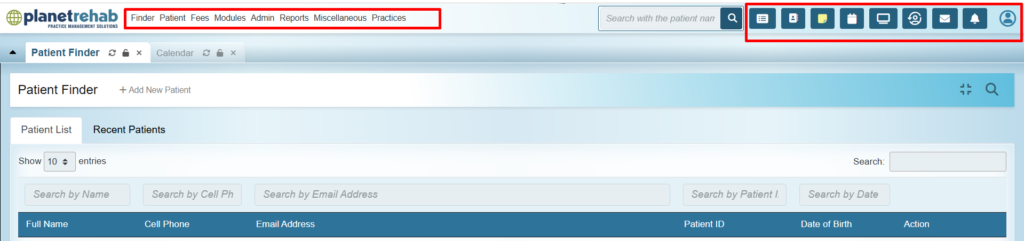
- Upon logging to the Planetrehab admin interface, here are the controls and the menus that PR admin would view:
| Menu | Purpose / Function | Typical Users |
| Calendar | View, add, and manage provider appointments; track daily/weekly/monthly schedules. | Front desk, providers |
| Finder | Search for appointment slots or patient schedules; locate available times. | Front desk |
| Flow (Patient Flow Board) | Track patient visit status (checked-in, waiting, in exam, checked-out). | Clinical staff, Front desk |
| Recalls | Manage patient follow-up reminders or recall lists. | Front desk, care coordinators |
| Messages / Messages icon with bubble count [Top right] | Internal messaging between staff and providers. Shows number of un-read emails count | All users |
| Patient | Register, search, and manage patient charts and demographics. | Front desk, Therapists |
| Fees | Manage billing, claims, payments, and fee sheets. | Billing team, admin |
| Modules | Enable/disable and configure optional system modules (eRx, portal, telehealth, etc.). | IT admin |
| Procedures | Create and manage lab orders, results, and lab integrations (e.g., Quest, LabCorp). | Providers, lab staff |
| Admin | Configure system settings, users, access control, and practice details. | IT admin |
| Reports | Generate clinical, financial, and operational reports; export data. | Management, billing, admin |
| Miscellaneous | Access additional tools like address book, batch communication, or utilities. | IT admin, support staff |
| Pop-ups | Manage and configure system alerts and reminder pop-ups. | IT admin |
| Practices | Set up and manage multiple practices/facilities within OpenEMR. | IT admin, practice manager |
| Notifications [Bell Icon] | Shows the reminders, notifications triggered from the system | PR admin |
| Avtar Icon [Account Settings] |
Need more help?
Contact Support
If you are stuck, contact the Planetrehab support team.